Swati Mishra

Updated 4 months ago

Streamlined webcam control for everyday use

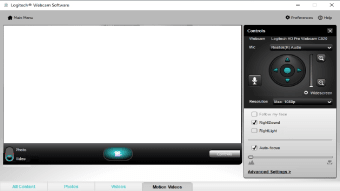
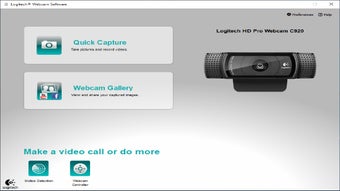
Logitech Webcam Software, developed by Logitech, is a free Windows utility designed to manage compatible Logitech webcams with ease. It offers simple tools for recording, image adjustments, and motion detection through an intuitive interface that’s easy for anyone to navigate. The setup process is quick, with automatic webcam detection and driver installation ensuring a smooth start.

Top Recommended Alternative

Straightforward tools and reliable features

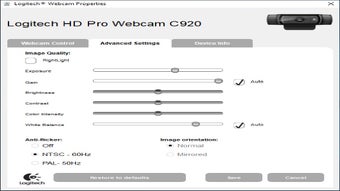
Logitech Webcam Software focuses on accessibility and practicality rather than visual flair. Users can adjust brightness, contrast, and white balance or enable anti-flicker settings for improved video quality. Its motion detection feature adds versatility, allowing users to customize sensitivity or schedule recordings—useful for basic monitoring or automated capture.

The built-in gallery organizes recorded content efficiently, while older versions offered options for direct uploads to social media. Although this feature may no longer function, the software remains dependable for offline management. However, Logitech Webcam Software is now considered legacy software, with compatibility strongest on older systems and webcams. It may not work properly on Windows 11 or newer devices that rely on Logitech’s modern apps such as Logi Capture or G HUB.

Final thoughts

Logitech Webcam Software stands out for its simplicity and ease of use, making it a practical choice for users who prefer straightforward control over advanced editing. While its dated interface and limited compatibility show its age, it remains a reliable option for older Logitech webcams and basic video recording needs.


Swati Mishra

Swati has over a decade of experience in content strategy, SEO, and editorial writing across technology and travel. She specializes in technical reviews, structured guidelines, and long-form pieces. Her work focuses on clear organization, search intent, and practical takeaways for readers evaluating software and digital tools.


  • Pros

    • Simple interface with easy-to-navigate controls
    • Effective motion detection with scheduling support
    • Quick installation and automatic driver setup
  • Cons

    • Limited creative or editing tools
    • Not officially supported on Windows 11
    • Legacy software with reduced compatibility for newer devices
 0/3

App specs

  • License

    Free

  • Version

    2.80.853.0
  • Latest update

  • Platform

    Windows

  • OS

    Windows 8.1

  • Language

    English

    Available languages

    • Danish
    • German
    • Greek
    • English
    • Spanish
    • French
    • Italian
    • Japanese
    • Korean
    • Dutch
    • Norwegian
    • Polish
    • Portuguese
    • Swedish
    • Turkish
    • Chinese
  • Downloads

    1.9M

    Last month's downloads

    • 6.3K
  • Size

    74.52 MB

  • Developer

Program available in other languages


User reviews about Logitech Webcam Software

3.5

6 reviews

Add review

Main reviews for you

  • Anonymous user

    Desktop software bundled with outdated and unavailable products? What the heck?!? Webcam works great, though.

  • Anonymous user

    Quick easy setup control is just enough to help out 3.0 mp great for conf calls

  • Anonymous user

    Its simply superb, wonderful and views are ultimate video quality is awesome and voice is also good

  • Anonymous user

    Not working with Windows 10.. Not working with Windows 10. I would believe a company like Logitech would be able to provide us with a way to download their driver but oh well... Cons: The product is not working.

  • Anonymous user

    False Advertising, or at the very least misleading.. Very misleading. Their website says ok for Windows 8, but then you find out that windows 8.1...NO! That "point one" is all that's needed to kill it. I had to give away the Logitech game I bought. What's the use, won't work.

  • Anonymous user

    This software does not support windows 8.1 according to the installer. Does not support windows 8.1 After I downloaded the software and ran it it still installed some optimizer pro cut down version but failed to install the Logitech software that I intended. Pros: Nothing Cons: Logitech need to supply easy to download software for their products

More

You may also like

Alternatives to Logitech Webcam Software

Explore Apps

Latest articles

Laws concerning the use of this software vary from country to country. We do not encourage or condone the use of this program if it is in violation of these laws.
Softonic

Is Logitech Webcam Software safe?

100/100

Score result: Clean

This file passed a comprehensive security scan using VirusTotal technology. It is safe to download.

  • Virus free
  • Spyware free
  • Malware free
  • Verified by Security Partners

    VirusTotal logo

Scan Info

Last scan
Monday, January 1, 2024
Scan provider
VirusTotal · Full report

File Integrity

File
lws280.exe
SHA256
a9cbba5638bea99f1d760dd979819026b5969bf7a4dd3591e3fa9639fab22142
SHA1
978867c1905983589c73d0134a630831ef28225b

Softonic security commitment

Logitech Webcam Software has been thoroughly scanned by our advanced security systems and verified by industry-leading partners. This file comes from the official developer and has passed all our security checks, showing no signs of viruses, malware, or spyware. For more information, visit our Security and Trust Center